
Download Sun PDF Import Extension – PDF Editing, OpenOffice Tool, Lightweight Utility
Overview
The Sun PDF Import Extension is a lightweight utility designed to extend the functionality of the OpenOffice suite by enabling basic editing of PDF documents. Built specifically for users who require simple modifications to existing PDFs, the tool serves as a supplementary solution for minor adjustments such as updating titles, resizing images, or changing page numbers. It is particularly useful for individuals and small teams working with static documents that need occasional tweaks without the need for full-scale editing software.
By integrating with OpenOffice’s Draw application, the extension provides a straightforward interface for manipulating PDF content at a granular level. This makes it ideal for users who are already familiar with OpenOffice and seek a free, no-frills option for light PDF edits. While it does not support complex formatting or bulk changes, its focused scope ensures minimal overhead and quick access to essential functions.
The extension was released in October 2008, indicating its long-standing presence in the open-source ecosystem. Despite its age, it remains relevant for users who prioritize simplicity and cost-effectiveness over advanced features. The developer did not provide additional technical details, and compatibility with modern systems may vary depending on the OpenOffice version in use.
Key Features & Functionality
- Basic PDF Editing: Allows users to modify titles, image dimensions, and page numbers directly within the PDF. Ideal for correcting minor errors or updating metadata without re-creating the document.
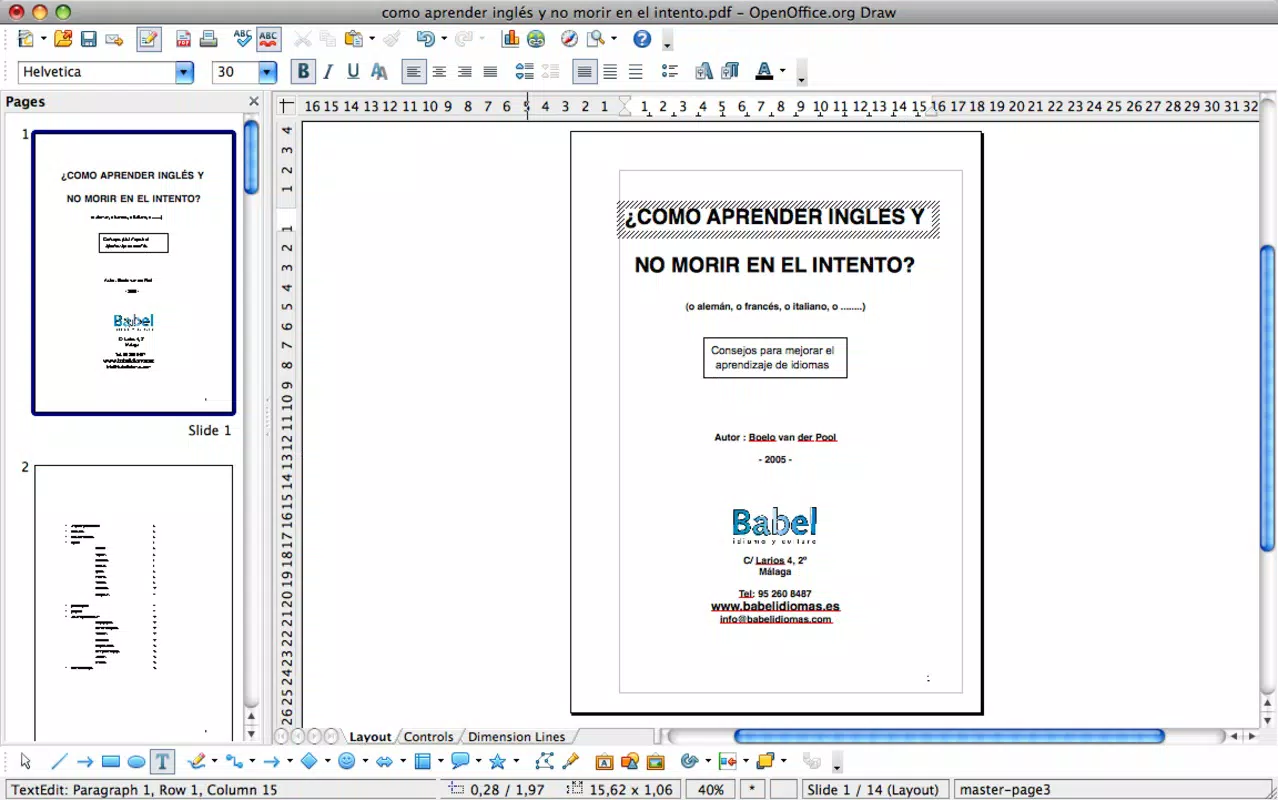
- Draw Application Integration: Leverages OpenOffice’s Draw tool to render and edit PDF content, offering a visual interface for selecting and adjusting elements such as text blocks and graphics.
- Line-by-Line Editing: For text modifications, users must edit content one line at a time, ensuring precision but potentially increasing the time required for larger documents.
- PDF Export Functionality: After edits are made, users can export the modified content back to PDF format, preserving all changes for sharing or printing.
- Free Basic Tool: The extension is available at no cost, making it a budget-friendly option for occasional PDF adjustments, especially for users already invested in the OpenOffice ecosystem.
For example, a small business owner might use this tool to update a company logo on a PDF brochure or correct a misspelled product name in a catalog. Similarly, a student could adjust the title of a submitted report or resize a chart for better presentation. While not suited for extensive rewrites, its focused capabilities deliver value in specific, real-world scenarios.
Interface, UX & Performance
The user interface of the Sun PDF Import Extension is tightly integrated with OpenOffice’s Draw application, which means the experience is consistent with the broader suite’s design language. Users interact with the PDF as a visual canvas, allowing them to select and modify individual elements such as text and images using familiar tools.
Navigating the interface is straightforward for those already comfortable with OpenOffice, though new users may require a brief learning curve to understand the layer-based editing system. The extension does not introduce additional menus or complex workflows, which helps maintain a clean and predictable user experience.
Although the developer did not list formal performance metrics, the lightweight nature of the tool suggests it runs efficiently on standard hardware. However, performance may vary depending on the size and complexity of the PDF being edited. Responsiveness could be impacted when working with large documents, especially those containing high-resolution images or multiple layers.
Stability is likely dependent on the underlying OpenOffice installation. Since the extension was released in 2008, compatibility with modern operating systems and updated versions of OpenOffice may require additional configuration or third-party patches. The developer did not specify any known issues or limitations related to crashes or data loss.
Platform Compatibility & Technical Requirements
The Sun PDF Import Extension is designed to work within the OpenOffice environment, which is available on multiple platforms including Windows, macOS, and Linux. However, the developer did not specify the exact operating system requirements or minimum OpenOffice version needed for compatibility.
The file size of the extension is not listed in the provided information, so users cannot assess storage impact or download speed. Similarly, no details were given about the software version or update frequency. This lack of transparency may affect users who rely on precise system specifications for deployment in professional or educational settings.
Compatibility information was not fully disclosed. Users are advised to ensure their OpenOffice installation is up to date and that they have administrative rights to install extensions. The extension’s reliance on an older software framework may limit its functionality on newer systems.
Pros and Cons
Pros
- Free to use, making it accessible for budget-conscious users and small organizations.
- Lightweight and integrates seamlessly with OpenOffice’s existing tools.
- Provides basic PDF editing capabilities without requiring expensive software.
- Allows export back to PDF format, preserving all changes for distribution.
- Simple interface for users already familiar with OpenOffice’s Draw application.
Cons
- Line-by-line editing can be time-consuming for large or complex documents.
- Limited to basic modifications; not suitable for advanced formatting or layout changes.
- No official updates since 2008, raising concerns about long-term compatibility.
- Developer did not provide technical specifications or known issues.
- Performance and stability may vary across modern operating systems and OpenOffice versions.
FAQ
Is Sun PDF Import Extension safe to install?
The extension is distributed through official OpenOffice channels and does not require elevated permissions. However, as it is no longer actively maintained, users should ensure their system is protected with updated antivirus software before installation.
Can I use this tool on Windows, macOS, or Linux?
The extension is compatible with OpenOffice, which supports Windows, macOS, and Linux. However, specific OS requirements were not listed by the developer.
Does the extension support editing full paragraphs?
Yes, but edits must be made line-by-line. This approach ensures precision but may be inefficient for large blocks of text.
Is the extension regularly updated?
There is no indication of recent updates. The last known release was in 2008, so users should expect limited support for modern systems.
Can I export my edited document back to PDF?
Yes, the extension includes a built-in PDF export function that preserves all changes made in the Draw application.
Final Thoughts + CTA
The Sun PDF Import Extension remains a niche but functional tool for users seeking a free, no-frills solution to make minor edits to PDF documents. Its integration with OpenOffice’s Draw application provides a familiar environment for those already using the suite, while its lightweight design ensures minimal system impact.
While it lacks modern features and has not been updated in over a decade, it still delivers value for basic tasks such as correcting titles, resizing images, or adjusting page numbers. For individuals and small teams operating on a tight budget, this extension offers a practical alternative to paid software.
However, users requiring advanced editing, bulk changes, or better compatibility with current systems should consider more recent alternatives. That said, for its intended purpose, the extension performs reliably and efficiently.
Download Sun PDF Import Extension now


